When working with station data in FieldClimate API, it’s important to understand how timestamps are handled - especially when timezones are configured at the station level.
Local Time vs UTC in Unix Timestamps
If a station has a timezone configured in FieldClimate, the Unix timestamps returned by the API will reflect local time, not UTC (or GMT). This behavior may cause some confusion, since Unix timestamps are typically expected to be UTC-based.
Checking the Station Timezone
You can verify the configured timezone offset for a station using the endpoint:
In the response, look for the field:
This value is expressed in minutes. For example:
120= UTC +02:000= UTC-60= UTC -01:00
Adjusting Time When Querying Data
Because timestamps in FieldClimate API are interpreted in local time you must account for the timezone offset when requesting data for a specific period.
Example:
In the example below, the desired data period to be retrieved is 21/04/2026 from 08:30 to 09:30 local time (Europe/Vienna timezone - UTC+02:00):
- Use the endoint /v2/station/{{STATION-ID}}, to retrieve the station timezone: "timezone_offset":
- Add or subtract the timezone_offset from the desired period. For instance:
- Instead of passing the Unix timestamp from 21/04/2026 08:30 to 21/04/2026 09:30:
- ❌ https://api.fieldclimate.com/v2/data/{{station-id}}/raw/from/1776753000/to/1776756600
- Pass it from 21/04/2026 10:30 to 21/04/2026 11:30:
- ✅ https://api.fieldclimate.com/v2/data/{{station-id}}/raw/from/1776760200/to/1776763800
This adjustment ensures the correct data is returned.
Using UTC Instead
If you prefer to work strictly in UTC and avoid timezone conversions, you can configure your station accordingly. Go to:
- https://fieldclimate.com/station/{{station-id}}/config
- Set the station timezone to UTC:
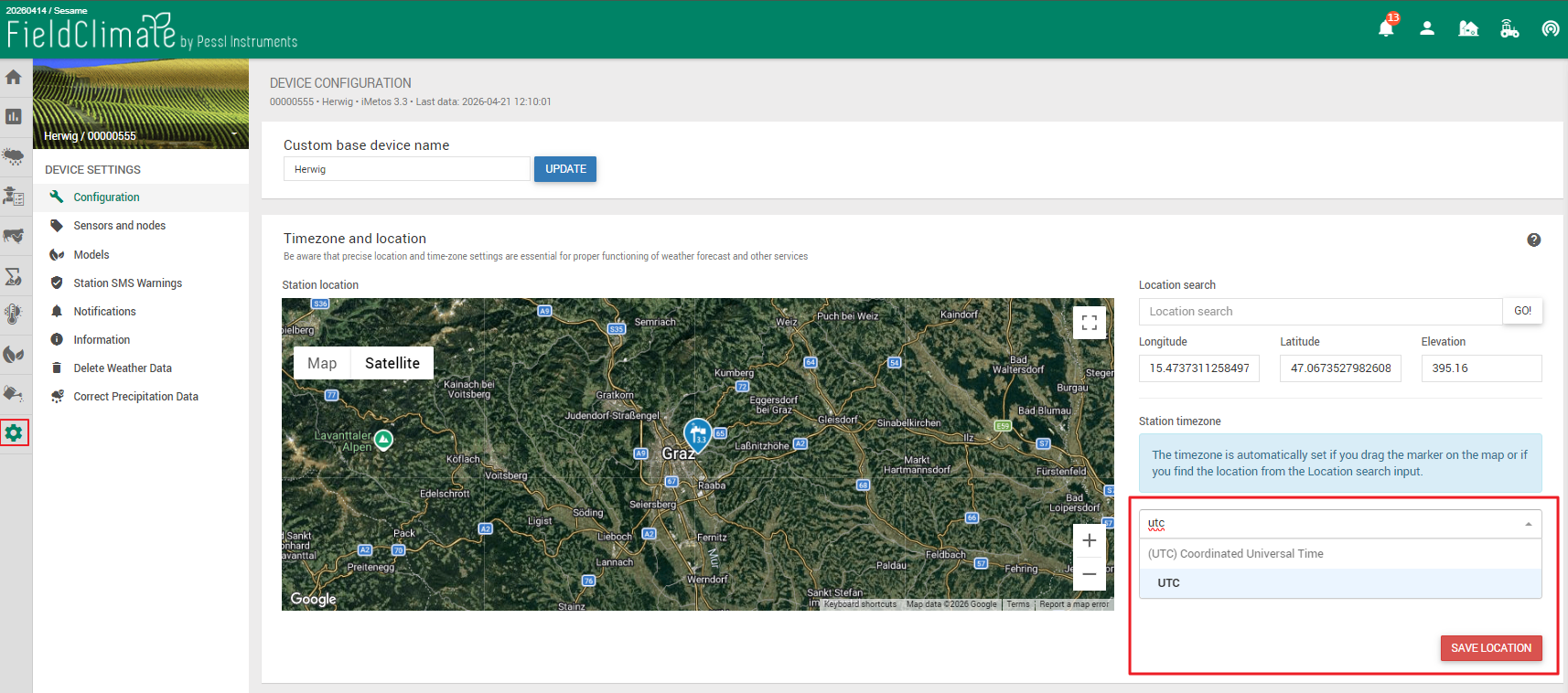
Once configured, all timestamps will align with UTC, simplifying data handling.
!!! Important Note !!!
When changing the timezone in FieldClimate, data gaps may occur as the device adjusts its internal memory.
Need Help?
If you encounter issues during this process or have questions about the information described in this page, please SUBMIT A TICKET to the METOS Support Center and include all the required information.
Was this article helpful?
That’s Great!
Thank you for your feedback
Sorry! We couldn't be helpful
Thank you for your feedback
Feedback sent
We appreciate your effort and will try to fix the article